
Furniture Product Data Handover for Private-Label Sellers
A practical checklist for checking supplier product facts, images and instructions before handing them to a private-label furniture listing team.
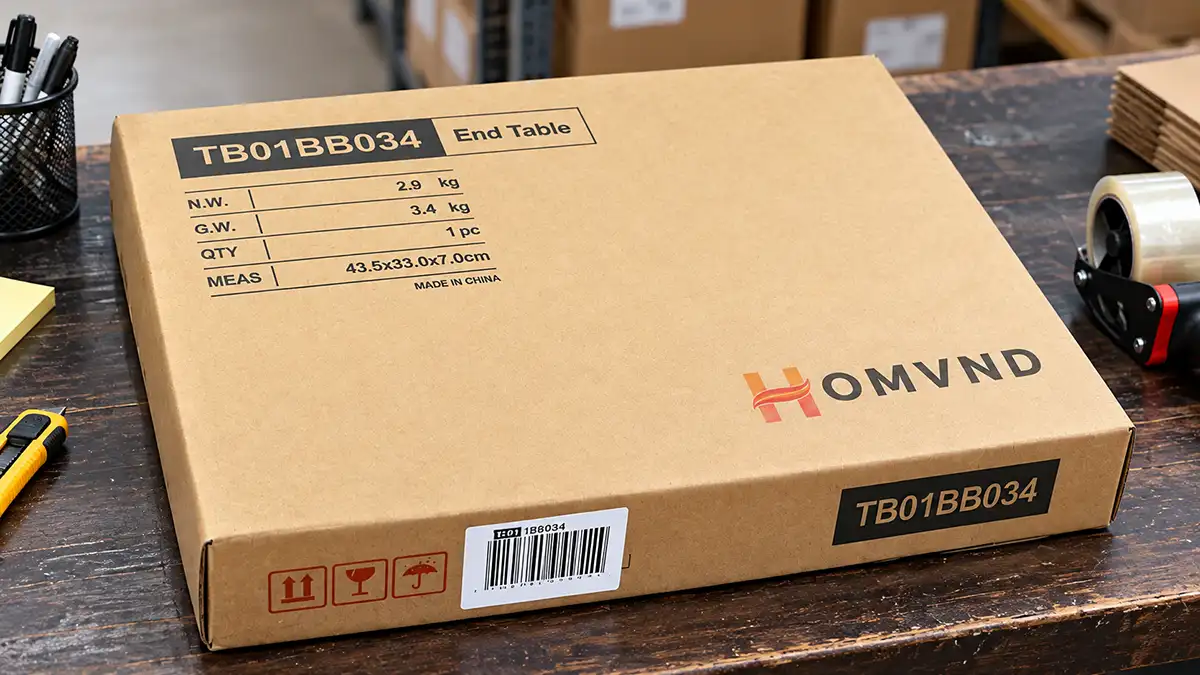
Example of model identification and packaging data printed on a furniture carton.
A folder of supplier photos and a spreadsheet can be enough to start preparing a furniture listing. They are not enough to tell whether the listing describes the item the customer will receive. A photo may show a pair while the offer sells one unit; a size field may contain carton dimensions; a manual may show hardware from an earlier design.
For private-label importers and sellers, product data handover means turning supplier facts into a checked information pack for a specific selling SKU. Start with the agreed product reference, collect the applicable facts and files, check them against one another, and keep unresolved fields out of the publishable copy. Then map the accepted information to your own store or marketplace.
Start with the Exact Item You Will Sell
Keep the supplier model and buyer SKU in separate fields. Add the specific size, finish or configuration, the product revision, the buyer-confirmed EAN where applicable, and the sales unit: one cabinet, a pair of tables or an identified set. Carton count belongs in another field; two cartons do not necessarily mean two products. Use the furniture sets, multipacks and multi-carton products guide to distinguish the sales unit from its carton configuration.
Ask the supplier to identify the specification, drawing or approved sample reference behind the data. If the item changed after photography or measurement, identify which files still represent the selling version. Do not copy one finish’s images or one size’s measurements across the whole family unless their applicability has been checked.
The furniture product specification sheet defines the product for development and production. This handover uses that definition to prepare customer-facing information. Logo, EAN and packaging-artwork approval remain part of the private-label development process; a missing or disputed EAN stays awaiting buyer confirmation rather than being guessed.
Request a Product Data Pack You Can Check
Agree which items below apply to the product, destination and channel, and who will supply them. This is a procurement checklist, not a promise that every supplier provides every file or a universal platform submission requirement.
On a small screen, scroll the table horizontally to reach the last column.
| Information to request | Seller’s cross-check | If missing or inconsistent |
|---|---|---|
| Identity and sales unit: supplier model, product revision, variant and quantity included; link to the buyer SKU and buyer-confirmed EAN. | Match the model, finish, configuration and unit count across the sheet, images, labels and proposed offer. | Separate ambiguous variants. Resolve the identifier or unit count before releasing that SKU’s listing. |
| Dimensions: assembled width, depth and height; relevant usable openings or clearances; labelled diagrams and units. | Check axis order, measurement points and whether a value describes the outside, usable interior or required operating space. | Request an annotated drawing or measurement record. Do not calculate usable space from outside dimensions. |
| Packed data: product net weight, carton count, and each carton’s sealed dimensions, gross weight and contents. | Keep product weight separate from packed weight. Reconcile the cartons to one complete sales unit. | Request the missing carton record and weight basis; do not substitute a total weight for a per-carton field. |
| Materials, finishes and inclusions: supported descriptions by component, finish reference, supplied parts, hardware and tools where included. | Distinguish substrate from surface appearance. Compare the contents list with photos and assembly instructions. | Ask for the relevant specification. Leave unsupported material or performance wording out; do not infer it from a photo. |
| Images and diagrams: files for the actual variant, dimension illustrations, file identities and permitted uses. | Check visible configuration, accessories, colour reference, image quality and permission for the intended channels. | Request the correct asset or clarify exclusions and rights. Do not use another variant’s image as a substitute. |
| Instructions: the applicable assembly manual, parts list, safety information and available language versions. | Check hardware shapes and quantities, part labels, assembly sequence and the product revision shown. | Request correction or a matching manual. Arrange any needed translation and review before customer use. |
| Market and safety information: applicable product identifiers, manufacturer details, relevant EU responsible-person details, warnings and supporting evidence references. | Determine the legal roles and destination requirements. Separate offer information from technical documents kept for verification. | Refer unresolved responsibility or safety questions to the appropriate compliance contact before publication. |
For packed data, use one line per carton rather than a single “package size” cell for a multi-carton product. Record the side order and units explicitly. If the pack-out is still changing, request the final measurements before using them in delivery or fulfilment fields. The packaging requirements guide covers how to define that physical package.
Check the Files Against Each Other, Not Just the File List
Open the images and manual alongside the data sheet and the agreed product reference. Work through one selling SKU at a time. The following situations are hypothetical examples, not HOMVND customer cases:
- The image includes extra items. A desk photo shows a chair and storage baskets, but the contents list supplies only the desk. Obtain a suitable product image and make the included items unambiguous. Do not let the photo imply a bundle that is not supplied.
- The dimensions describe different objects. A spreadsheet’s “depth” was copied from a sealed carton, while the diagram shows the assembled cabinet. Ask which record measures the furniture and which measures the carton; correct the field mapping rather than choosing the smaller number.
- The manual belongs to an older construction. The current hardware list shows a different connector from the instruction diagram. Return the exact page and part reference for review, and hold the manual from customer download until the mismatch is resolved.
- Two variants have been mixed. A narrow unit’s images sit beside a wider unit’s dimensions and EAN. Split the records and ask for the correct files for each. Renaming the folder alone does not correct its contents.
When two sources conflict, identify both values and their origins. A recent email does not automatically override an approved drawing, and an attractive catalogue image does not establish the material beneath a finish. Ask the relevant information provider to resolve the discrepancy against the actual selling product.
Hand Over a Small, Traceable File Pack
A shared folder and a short manifest can be sufficient. Keep one row per file or data group, with the buyer SKU and variant, product revision, exact filename, file version or date, language, information provider, reviewer and status. Include the source of measured or technical facts, permitted media use, and any open question.
For example, an illustrative filename is SKU-A_oak_manual_product-R2_file-v3_EN.pdf. Its manifest should explain that R2 identifies the product and v3 identifies the document. The name helps locate the file; it does not prove that the contents match. A spreadsheet with separate fields works just as well if long filenames become awkward.
Use statuses that distinguish the work actually completed: received—not checked, correction needed, or checked for the named SKU and intended use. Keep channel mapping as a separate step. Receiving a PDF, or approving a production sample, is not acceptance of every listing field.
Before transferring the pack to the listing team, check that:
- Every selling SKU and variant has an identified sales unit and a current source record.
- Dimensions and weights name the measured object, units and applicable carton or product.
- Images, included items and instructions describe the same configuration, with media rights recorded.
- Open issues name the affected field or file, the person who can answer, the requested evidence and the next review date.
- The listing team receives the accepted files plus the open-issues list; superseded files are clearly separated from the working pack.
Classify each gap by its effect. A missing optional lifestyle photo may allow preparation to continue with an authorised product image. An unresolved sales unit, conflicting dimensions or missing required safety information should hold the affected listing from publication. Request a specific correction—such as the sealed dimensions of carton 2—rather than “send complete data.” Recheck the corrected field and anything it changes, such as a diagram or delivery input.
Keep Channel Mapping and Publication with the Seller
The supplier provides agreed product facts and supporting files; the seller still needs to select the category, map those facts to the channel’s fields, arrange suitable language versions and review the final offer. Do not copy a platform field simply because its label resembles a spreadsheet heading.
For example, bol’s official data model sets out product classifications and attributes, while Allegro’s catalogue guidance explains category parameters and product identifiers. Use the current requirements for the selected category and market. Neither platform’s field list is a universal furniture data standard.
For EU distance sales within its scope, GPSR Article 19 requires the offer to clearly display manufacturer identification and postal/electronic contact details; responsible-person details when the manufacturer is outside the EU; product identification, including an image and type; and applicable warnings or safety information in the language required by the destination Member State. Under Article 13(1), placing a product on the market under your own name or trademark makes you the manufacturer for GPSR purposes, with Article 9 obligations. Supplier files do not transfer those responsibilities.
Keep the information needed on the offer separate from the evidence used to substantiate it. This checklist does not require public upload of every test report. Retain relevant supporting documents for the applicable verification or compliance purpose, and check any platform-specific request separately. Official platform and GPSR sources checked on November 4, 2026.
Before going live, review the actual listing preview: selected variant and identifier, quantity sold, dimensions and units, inclusions, images, downloadable manual, language and required safety/contact information. Check imported or pre-filled catalogue values as well as text your team entered. A technically accepted upload is not proof that the customer sees the correct product.
Include the Data Request in Your Sourcing Discussion
When asking HOMVND about a furniture project, share the supplier model or product reference, proposed buyer SKUs and variants, target countries and channels, sales-unit plan, expected order quantity, required languages, and the facts or files you already have. Add a short missing-data list and say which items are needed for listing preparation. Ask which materials can be supplied for the proposed product and what still needs confirmation.
Discuss your furniture project and product-data requirements.